
%%{init: {'flowchart': {'nodeSpacing': 25, 'rankSpacing': 30, 'padding': 6}}}%%
graph TB
    EXT["External Systems & Partners"]

    subgraph PMP["Greyfinch Practice Management Platform (PMP)"]
        direction TB
        subgraph CONNECT["Greyfinch Connect"]
            direction TB
            API["API<br/>open data access"]
            APPS["Apps<br/>extend the UI, bring data in"]
            HUB["Automation Hub<br/>events to actions"]
            AGENTS["Agents<br/>AI across Connect (beta)"]
            API ~~~ HUB
            APPS ~~~ AGENTS
        end
        GF["Practice Management Software (PMS)"]
    end

    EXT <--> PMP
    CONNECT <--> GF

    style PMP fill:#f7fbff,stroke:#9cc3e0
    style CONNECT fill:#e1f5ff,stroke:#aad4e8
    style GF fill:#f0fff0,stroke:#aadcaa
style EXT fill:#fff4e1,stroke:#e8d4aaOverview
Greyfinch Connect opens Greyfinch up so your practice, and the vendors you already work with, can extend, integrate, and automate it safely. Most practice management software is closed: data stays locked inside, every new tool means manual double-entry, and adopting new technology is slow and expensive.
Greyfinch is an open, AI-native runtime you can build on. AI is a first-class part of the platform, not an add-on, with agents you can put to work across your workflows. Connect gives you a few ways to build on it.
1. API
The GraphQL API gives you programmatic access to your practice data, including patients, appointments, treatments, documents, images, and reports. You can use it for custom dashboards, analytics, bulk operations, or syncing with other systems. It supports querying and writing today, and we keep adding to it.
2. Apps
An App describes how a third party plugs into Greyfinch. It is defined in a single document, so the whole integration can be version-controlled, reviewed, and validated before it goes live. A practice can install as many apps as it needs. Each app is built from a few parts:
Launchers are buttons and links placed where work happens, such as the patient chart, a phone number, an image, or the global menu. A launcher can open a simple link, call a remote server, show a QR code, or open an embedded screen that runs a partner's interface in-app without switching software, and it can run short guided flows.
Resources are data brought in from an outside system and stored as a record in Greyfinch. For example, a remote-monitoring tool can tell Greyfinch that treatment is progressing and keep sending updates as it changes.
External mappings let you tag Greyfinch records, such as patients, appointments, images, and orders, with your own external IDs, so you can match them to your system and find them again from the outside.
Displays show those resources inside Greyfinch, today in the patient header and the treatment timeline, so staff see the context without leaving the chart.
Sync matches external patient records to Greyfinch patients and links them, then keeps them aligned over time. This is usually a one-time setup, with automations maintaining it afterward.
Webhooks are a set of actions against Greyfinch that an outside system can trigger. They are useful for partners that cannot call the API directly, and they shorten setup time for teams that already run a webhook or low-code platform.
3. Automation Hub
The Automation Hub is how you react to events inside Greyfinch. Events include appointment state changes, treatment status, contract or document signing, medical-form submissions, lead-status changes, demographic updates, and new resource data. Each event can trigger one or more actions, defined in the app.
The available actions include sending a message, running an AI agent, executing a report (and acting on the whole report or row by row), creating or updating tasks, calling an external system, and triggering other automations. An automation can react to your own app's events or to events from other apps installed on the same practice, so automations can build on each other. With this you can put together most of the automation workflows a practice needs.
4. Agents
You define AI agents in an app and put them to work across Greyfinch. They are not a separate surface so much as a capability that runs through everything else: an automation can hand work to an agent, a launcher can open one, and they can draw on the same data and context the rest of Connect uses. You define an agent once, declaratively, and reuse it wherever it helps. Agents are available today in beta, and we are adding tools, capabilities, and reach regularly.
Why it matters
Everything in Connect is defined declaratively. You own the definition, you can version it, review it, and grow it safely, and you can create as many integrations and automations as you want. No one else works like this, and that is what sets us apart. It gives you a deep, well-controlled way to extend Greyfinch and connect it to the rest of your technology.
What is coming next: more API coverage, more automation actions and events, and more tools and reach for agents. The set of extension points keeps growing, and we add new ones with partners. If there is a part of Greyfinch you want to extend, talk to us at [email protected].
How it ties together
At a glance
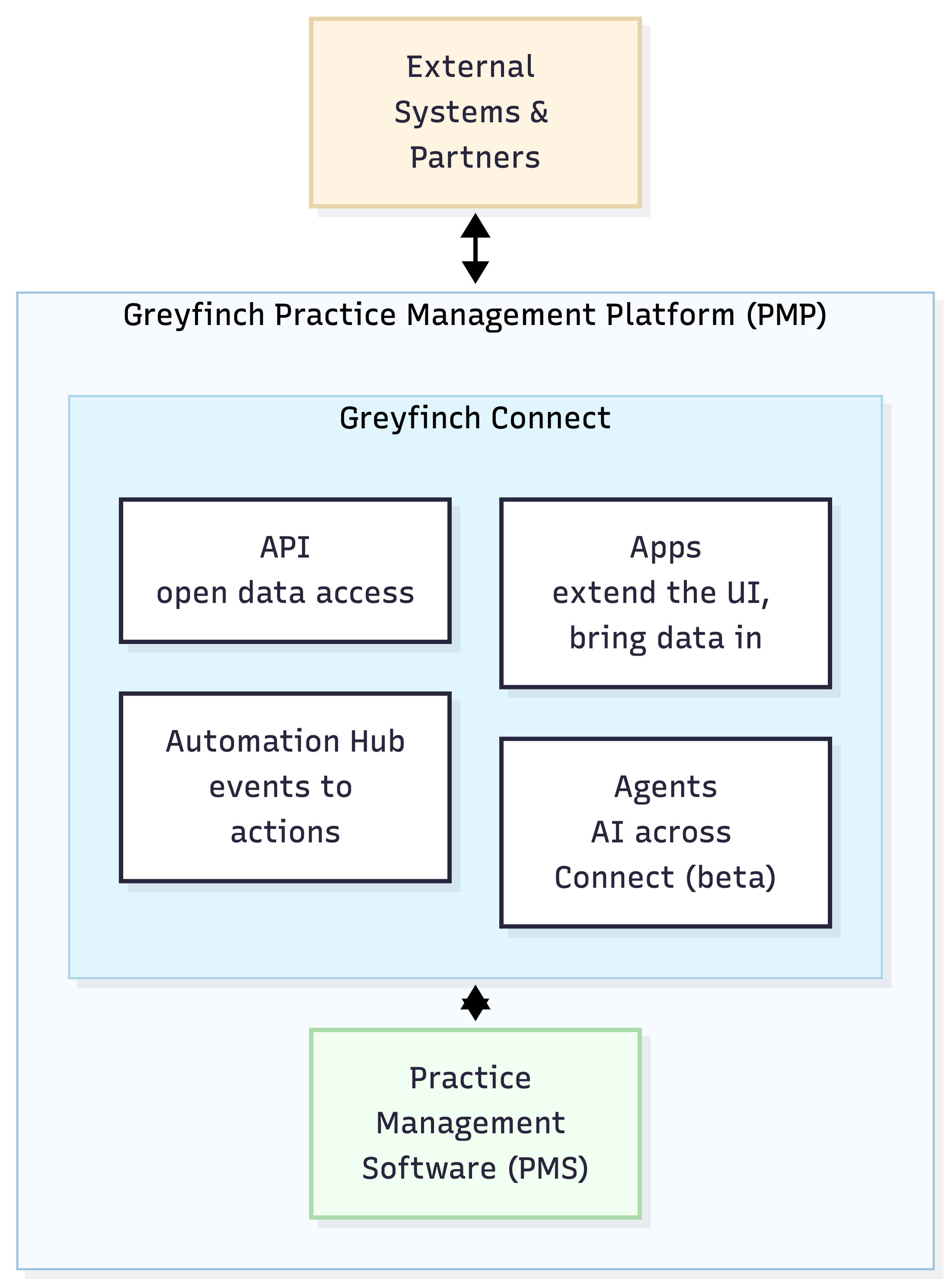
A high-level view. Your external systems connect to the Greyfinch Practice Management Platform (PMP). Within it, Greyfinch Connect opens the platform up, sitting between your systems and the Practice Management Software, with data flowing both ways. Connect itself holds four capabilities: the API, Apps, the Automation Hub, and Agents.
Mermaid source
The building blocks in detail
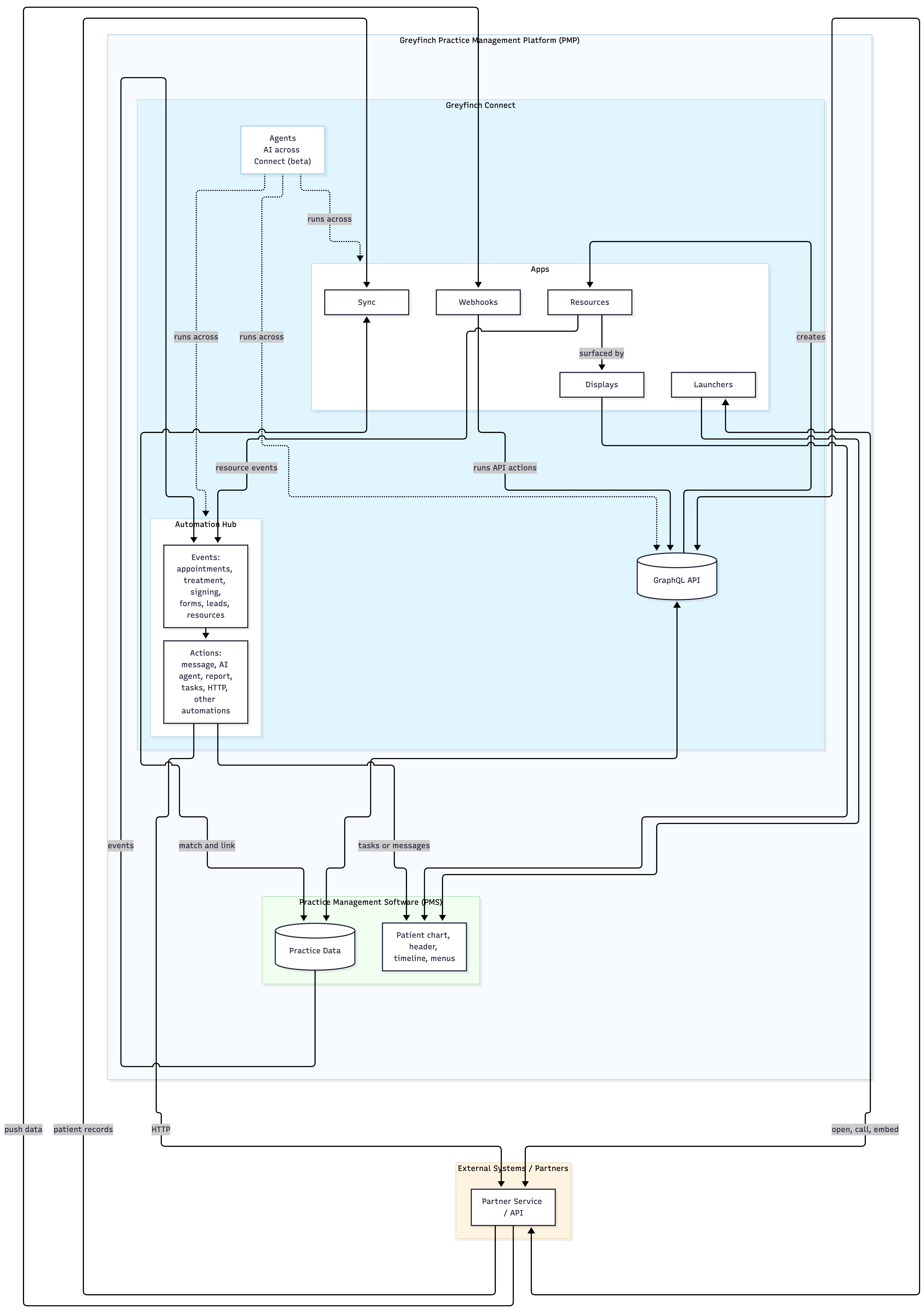
A closer look. Everything you define in an app, including its launchers, resources, displays, sync, webhooks, automations, and agents, is declarative, versioned, and auditable. The API is the programmatic spine, the Automation Hub turns events into actions, and agents run across the whole thing.
Mermaid source
graph TB
    subgraph EXT["External Systems / Partners"]
        SYS[Partner Service / API]
    end

    subgraph PMP["Greyfinch Practice Management Platform (PMP)"]
        direction TB

        subgraph CONNECT["Greyfinch Connect"]
        direction TB

        subgraph APPS["Apps"]
            L[Launchers]
            R[Resources]
            D[Displays]
            S[Sync]
            W[Webhooks]
        end

        API[(GraphQL API)]

        subgraph HUB["Automation Hub"]
            EV[Events:<br/>appointments, treatment, signing,<br/>forms, leads, resources]
            AC[Actions:<br/>message, AI agent, report,<br/>tasks, HTTP, other automations]
            EV --> AC
        end

        AGENTS["Agents<br/>AI across Connect (beta)"]
    end

        subgraph GF["Practice Management Software (PMS)"]
            UI[Patient chart, header, timeline, menus]
            DATA[(Practice Data)]
        end
    end

    %% Apps extend the runtime UI
    L --> UI
    D --> UI

    %% Launchers open, call, or embed the partner system
    L <-- open, call, embed --> SYS

    %% Partners push data in through webhooks, which run actions against the API
    SYS -- push data --> W
    W -- runs API actions --> API
    API -- creates --> R
    R -- surfaced by --> D

    %% Sync pulls patient records from the partner API and links them
    SYS -- patient records --> S
    S <-- match and link --> DATA

    %% Events drive automations; actions reach out and back in
    DATA -- events --> EV
    R -- resource events --> EV
    AC -- HTTP --> SYS
    AC -- tasks or messages --> UI

    %% API is the programmatic spine
    API <--> DATA
    SYS <--> API

    %% Agents run across the app, the hub, and the API
    AGENTS -. runs across .-> APPS
    AGENTS -. runs across .-> HUB
    AGENTS -. runs across .-> API

    style PMP fill:#f7fbff,stroke:#9cc3e0
    style CONNECT fill:#e1f5ff,stroke:#aad4e8
    style GF fill:#f0fff0,stroke:#aadcaa
    style EXT fill:#fff4e1,stroke:#e8d4aa
    style APPS fill:#ffffff,stroke:#aad4e8
    style HUB fill:#ffffff,stroke:#aad4e8
    style AGENTS fill:#ffffff,stroke:#aad4e8
Was this helpful?
Was this helpful?